![Untitled design (29)-1.png]](https://help.coastr.com/hs-fs/hubfs/Untitled%20design%20(29)-1.png?height=40&name=Untitled%20design%20(29)-1.png)
Step 1: Click on invoices under ‘Billing’ tab on the Car and Van Rental Software.
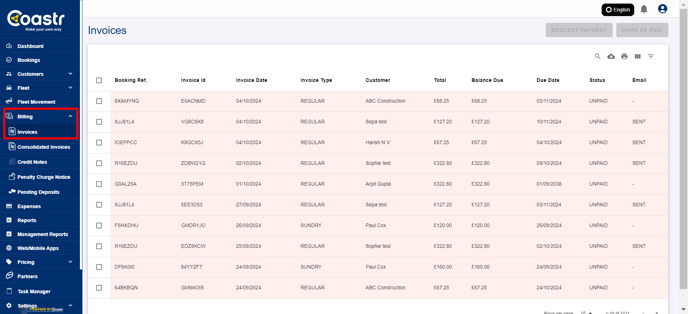
Step 2: Select the invoices by clicking on the square next to the booking reference.
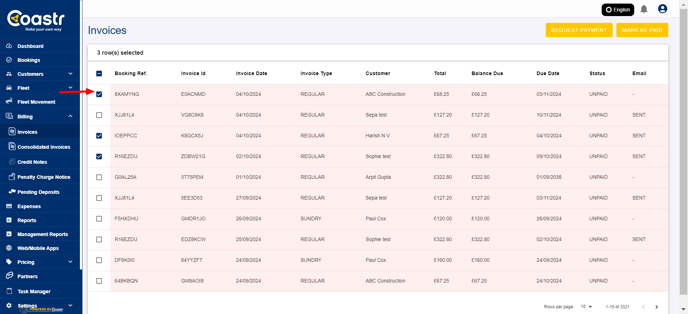
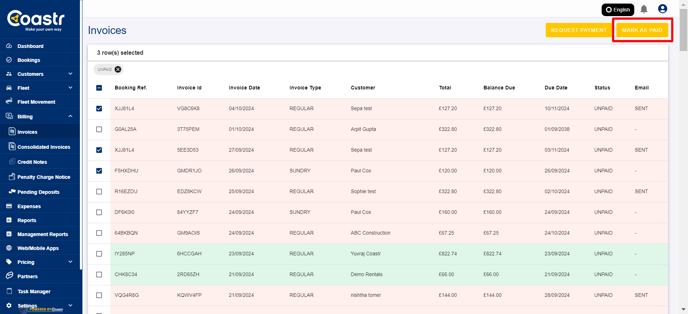
Step 3: Click on the ‘Mark as Paid’ option on the top.
Step 4: A confirmation window will appear. Click on confirm to mark all the selected invoices as ‘Paid By Cash’
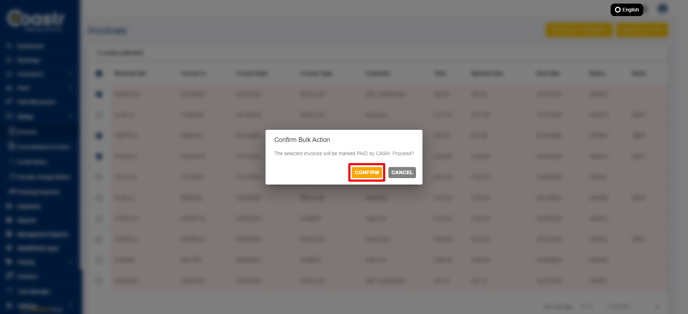
That's it! You have successfully marked the selected invoices as paid.
If you've any questions or issues, please email support@coastr.com. We're happy to help!
If you found this article useful then please vote below, it helps us massively. Thank you!