![Untitled design (29)-1.png]](https://help.coastr.com/hs-fs/hubfs/Untitled%20design%20(29)-1.png?height=40&name=Untitled%20design%20(29)-1.png)
Coastr supports BACS Direct Debit payments via our payment integration with Stripe. Stripe users in the UK can accept BACS Direct Debit payments from customers with a UK bank account.
To debit an account, businesses must collect a mandate from their customers. The mandate includes the customer’s sort code, account number, name, email, and full address. Stripe can generate this mandate for businesses to present to their customers.
BACS Direct Debit transactions have a limit of 100,000 GBP each. New users have an additional weekly limit of 10,000 GBP, which quickly increases as you process more BACS Direct Debit payments. If you need higher limits, you can contact Stripe support.
BACS Direct Debit is a reusable, delayed notification payment method. This means it takes 4 business days to confirm the success or failure of a payment when a mandate is already in place, but when you must collect a new mandate, it can take 7 business days.
Timing
With BACS Direct Debit, it can take several business days for funds to become available in your Stripe balance. The number of business days it takes for funds to become available is called the settlement timing. Payments submitted after the daily cut-off are processed on the next business day.
It takes 4 business days to confirm the success or failure of a BACS Direct Debit payment when a mandate is already in place and 7 business days when you must collect a new mandate.
In some cases, the bank might notify Stripe of a payment failure after the payment has been marked as successful in your Stripe account. In this case, the payment failure is identified as a dispute with the appropriate reason code.
The following table describes the settlement timings for BACS Direct Debit payments that Stripe offers. All timestamps are in UTC.
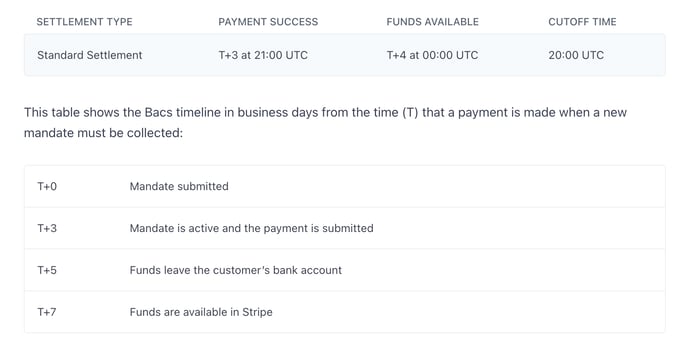
Debit notifications
BACS Direct Debit requires that customers are notified of the following:
- When payment details are initially collected and confirmed
- Each time a debit will be made on their account
By default, Stripe automatically sends emails to the customer for the above cases.
Disputes
BACS Direct Debit provides a dispute process for customers to dispute payments.
Caution: Customers can dispute a payment through their bank for an unlimited period of time.
When a dispute is created, Stripe sends a webhook event and deducts the dispute amount from your Stripe balance.
Unlike credit card disputes, BACS Direct Debit disputes are final and can’t be appealed. If a customer successfully disputes a payment, you must contact them if you want to resolve the situation. If you’re able to come to an arrangement and your customer is willing to return the funds to you, they must make a new payment.
Mandates
As part of the payment process, you must collect a mandate which gives you the authorisation to debit an account. For BACS, this mandate is called a Direct Debit Instruction, or DDI.
Your customers can request the cancellation of a mandate at any time. To cancel a mandate, a customer can either reach out to the party they established the mandate with, or to their bank. Canceling a mandate invalidates any future debit requests that you issue using this mandate. If you want to accept additional payments from your customer, or continue using BACS Direct Debit for a Subscription, you need to establish a new mandate by recollecting payment details.
Mandate cancellation
Mandate cancellation ensures that no further debit requests can be made using the cancelled mandate. When a customer requests cancellation through the party they established it with or directly through their bank, it renders any future debit requests associated with that mandate invalid. You can also cancel active mandates by detaching the payment methods and sources associated with them. You can detach a payment method by deleting it from the Customer view in the Stripe Dashboard.
Customers can also contact their bank to transfer existing mandates to a new bank or to report a name change. In these cases, Stripe automatically handles the update and reflect the updated mandate details.
Mandate events
The mandate can change at any time after you’ve collected it. This might be the result of the customer instructing their bank to amend the mandate or because of a change in the bank itself (for example, the customer changes to a different one).
Refunds
Refunds for payments made with BACS Direct Debit must be submitted within 180 days from the date of the original payment. Refunds require additional time to process (typically 3-4 business days). If you accidentally debit your customer, please contact them immediately to avoid a payment dispute.
Warning: Refunds aren’t part of the BACS Direct Debit scheme and are provided outside of BACS Direct Debit by Stripe. Since BACS Direct Debit has an indefinite indemnity period, if a customer creates a dispute any time after a refund has been issued, you can lose both the disputed amount and the amount you refunded separately.
You can issue full or partial refunds for Direct Debit payments by creating a Credit Note on Coastr. Refunds are processed only after the payment process is complete. If you create a full or partial refund on a payment that hasn’t completed yet, the refund process starts when the Charge's status transitions to succeeded. If the Charge's status transitions to failed, the full or partial refund is marked as cancelled because the money was never debited from the customer’s bank account.
How to record a BACS Direct Debit payment on Coastr?
Pre-requisite: You need to have an active Stripe account and it needs to be connected to Coastr. If you're not sure about this, please contact your Account Manager or email support@coastr.com.
Step 1: Make sure you have the Stripe Account ID added in the Organisation Settings on the Coastr Car and Van Rental Software.
Step 2: Create a quote and click the 'Pay & Confirm' button to proceed. 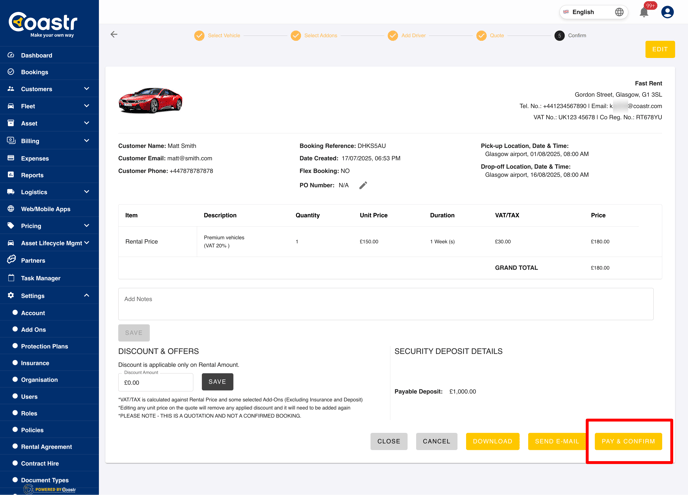
Step 3: Here, choose BACS Bank Debit and then click on the 'Proceed to Pay' button. 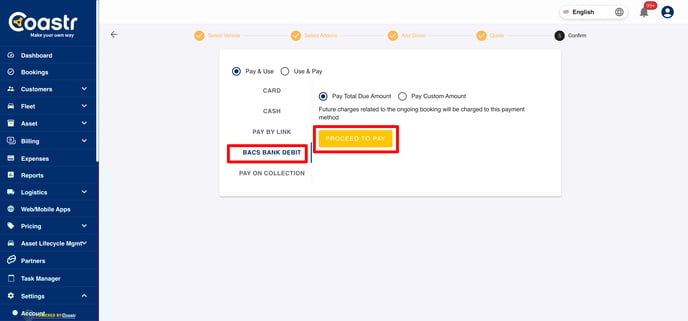
Step 4: At this point, the Stripe Checkout screen will load, showing the amount and the customer's email address pre-filled. Enter your customer's payment method details such as the Sort Code, Bank Account Number, Full Name and Billing Address. Read out the customer declaration and tick the box before clicking on the blue 'Continue' button. 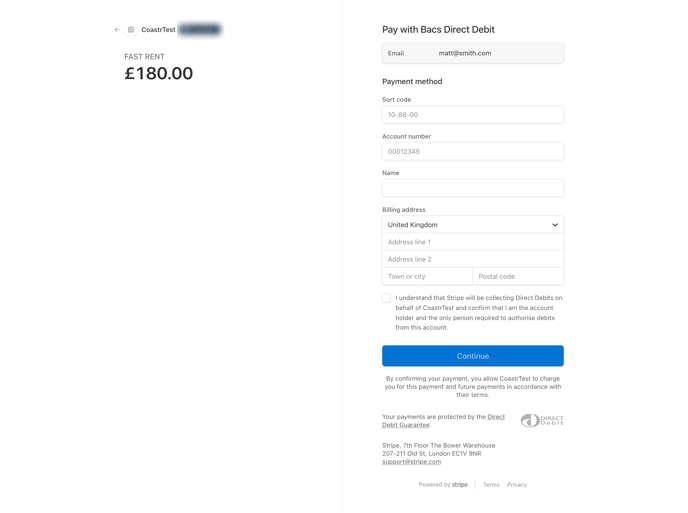
Step 5: Once the Continue button is clicked, review the details provided in the next screen. If all details are correct, then click on the 'Pay' button to continue. If not, then click on the blue 'Modify' text to go back to the previous screen to update details. 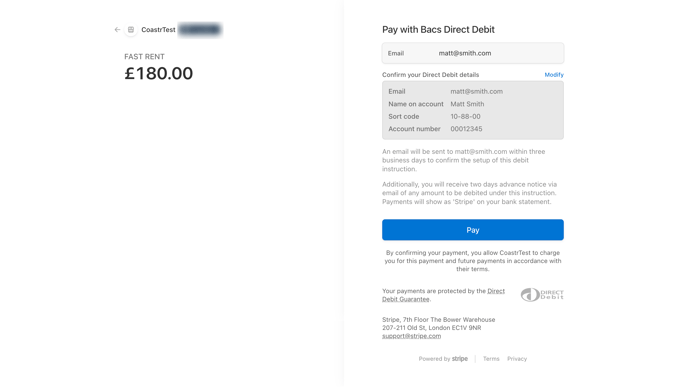
Step 6: Once the Pay button is clicked, it will show 'Processing' and then turn green to indicate success of Direct Debit Mandate collection. At this point, you'll be redirected to the booking management page on Coastr showing the booking status as 'Confirmed'. 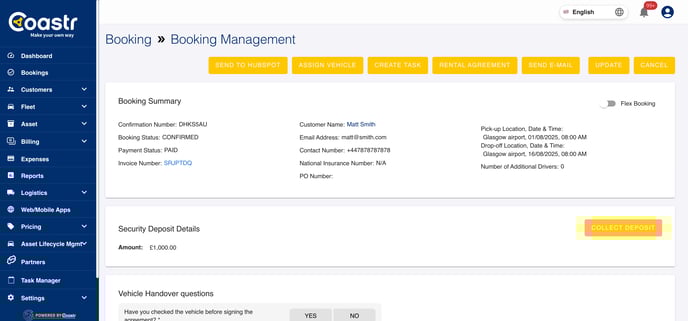
Note: The Payment Status here may not show as 'PAID' immediately because it takes 4 business days to confirm the success or failure of a BACS Direct Debit payment when a mandate is already in place and 7 business days when you collect a new mandate.
Step 7: When the Direct Debit payment is received, the payment status and the invoice status will automatically update to 'Paid'. You can view the payment details in the Payments section at the bottom of the invoice. 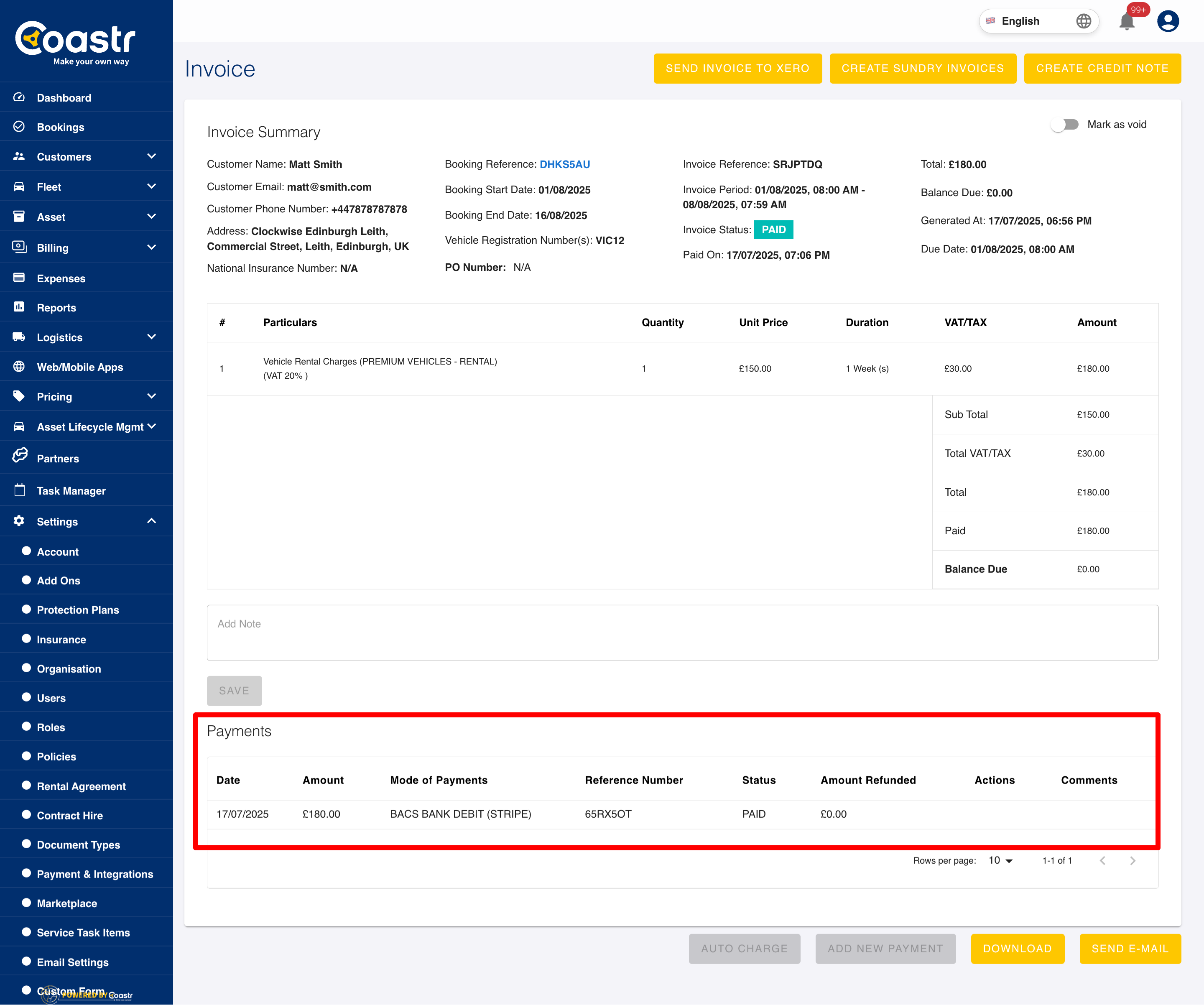
Note: If you've created a long-term booking with recurring billing/invoicing then the Coastr system will automatically generate the next invoice as per the billing schedule (Weekly or Monthly) and also automatically request payment via BACS Direct Debit through Stripe.
That's it. You've successfully recorded a BACS Direct Debit via Stripe on Coastr.
If you've any questions or issues, please email support@coastr.com. We're happy to help!
If you found this article useful then please vote below, it helps us massively. Thank you!